


Chicago Tribune
2.6793.00 Reviews
App Specs
- Version
- 10.0.60
- Updated On
- License
- Free
- Downloads
- 100,000+
- Developer
- Tribune Publishing Inc.
- Categories
- News & Magazines
- Platform
- Android
Screenshots
 Analysis by AppCompare
I judge a local-news app by whether it helps me understand what is happening nearby without making every visit feel like a scavenger hunt. The Chicago Tribune app has a clear purpose: it brings the newspaper’s reporting to a phone, with a focus on Chicago and the surrounding news that matters to its readers. I find that appeal strongest when I want a familiar local source rather than another broad feed assembled from headlines across the internet. The trade-off is that a newspaper app is most useful when its coverage matches your interests, and less compelling if you mainly want a free, all-purpose stream of national news.
A local paper works best when you use it with a question in mind
Instead of opening the app and scrolling without a plan, I’d use it to answer something specific: What changed in the city today? Is there a development in a neighborhood issue I follow? What is the latest on a Chicago sports story? That small shift makes a local publication more valuable than a generic news aggregator, because the point is not simply to collect headlines. It is to follow the reporting and context around a place.
A practical routine is to check the main news early, then return only when a story affects your day. If you commute, for example, a quick morning read can help you catch a major local development before conversations at work or school move on. Later, you can look for a fuller account rather than relying on a notification or a headline alone. I would treat alerts as a prompt to investigate, not as a replacement for reading the article.
What to expect from a newspaper app
News apps generally fall into two useful camps: aggregators that gather stories from many outlets, and publisher apps built around one newsroom. The first can be convenient when you want several viewpoints in one place. The second can be a better fit when you value a consistent local reporting source and want to follow the paper’s own coverage. This app belongs to the publisher-led approach, so its particular value depends on how much Chicago-focused reporting you want in your regular reading.
That distinction also affects how I’d use it alongside other sources. For a major national or international story, I might compare coverage across more than one publication; for a city issue, I would start here and then look for additional context if the decision calls for it. A single paper can offer depth and continuity, but no one publication should be mistaken for the whole picture. That is not a flaw unique to this app; it is a sensible limit to keep in mind with any one-outlet news routine.
Who is likely to get the most from it
I’d recommend trying it if you live in Chicago, have family or work there, or simply want a regular way to keep up with the city. It may also suit former residents who still care about local developments. Someone who mostly follows national headlines, rarely reads local reporting, or wants every source gathered into one customizable feed may be happier with a broader news aggregator instead.
The app is free to install, which makes it easy to try before deciding whether it belongs in your routine. Its Everyone age rating means it is presented for a general audience, though readers should still use their own judgment about the subject matter in individual news stories. The publisher is Tribune Publishing Inc.; the app has been available since October 11, 2010, and its current version is 10.0.52. It requires Android 8.0 or later, a practical point to check before downloading on an older device.
Worth Reading Before You Choose

EA SPORTS FC Mobile 26 Is a Bigger Football Game, but It Takes Time

Flipboard Shows What News Apps Must Do Beyond the Feed

Switching to Android Auto Means Rethinking Your Driving Routine

Google Calendar Makes a Crowded Week Easier to Manage

Ludo King Makes the Most of the Minutes Between Plans

Baby Panda World Brings Quick Play to Modern Phones, but Its Game Library Feels Busy
There is a financial decision to make after installation. The app includes in-app purchases ranging from $0.99 to $199.99 per item, so “free” describes getting the app, not necessarily unrestricted access to every piece of content. I would read the purchase details shown in the app before committing, and consider how often I expect to read. If I only want occasional headlines, a paid option may not feel worthwhile; if I rely on the paper’s reporting regularly, access could make more sense. The key is to decide based on your actual reading habits, not on the assumption that every story will be available at no cost.
Small habits that make the experience more useful
For a less noisy news routine, I’d avoid treating every alert as urgent. Keep notifications only if they help you catch genuinely time-sensitive local developments, and turn them off if they interrupt more than they inform. You can still open the app when you choose, which puts the timing back in your hands. This is especially useful if you check the news at fixed points in the day rather than following it continuously.
I’d also make a distinction between reading a headline and following a story. When an issue affects a neighborhood, school, workplace, or local service, return to the coverage as it develops instead of forming an opinion from one brief update. A publisher app can be a useful home base for that habit, while outside sources can help test what you have learned. The payoff is a more grounded understanding, not simply a larger pile of articles.
The audience figure gives a sense of the app’s reach: it has over 100,000 installs. Its average rating is 2.6 from around 1,900 ratings, alongside 790 written reviews. I wouldn’t use a score by itself to decide whether a newspaper app is right for me, since reading habits and expectations vary. Still, that rating is a reason to approach it with realistic expectations and judge the navigation, access, and coverage against what you personally need.
First Impressions
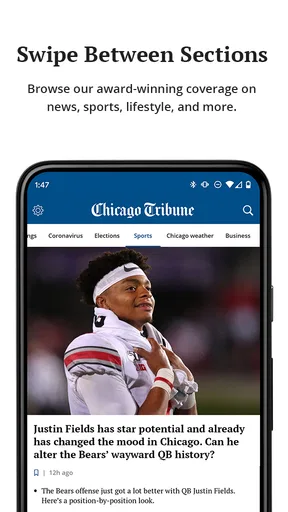
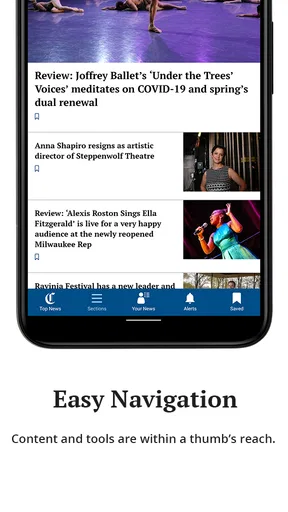
When you first open the Chicago Tribune app, it greets you with a sleek and clean interface. No clutter, just straightforward access to the news. It's like having your morning newspaper without the ink stains. The design is intuitive, allowing you to easily navigate through different sections like News, Sports, and Entertainment. Trust me, even if tech isn't your thing, you’ll find it pretty easy to get around.
Features That Stand Out
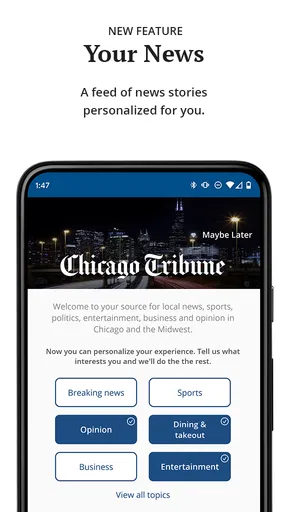
One of the standout features of this app is its personalization options. You can tailor your news feed to focus on topics that matter most to you. Whether you're into politics, local news, or the latest sports updates, you can customize your preferences. It's like having your own personal news curator. How cool is that?
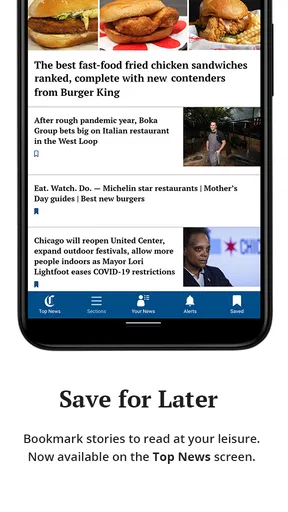
The app also includes a handy offline reading feature. This is perfect for those moments when you're stuck without Wi-Fi or data. Just download the articles when you're online, and read them later at your convenience. It’s like carrying a pocket-sized library of news with you everywhere.
Breaking News Alerts
For those who need to stay in the know, the app offers real-time breaking news alerts. You’ll get notifications for important events, so you're always up to date. This feature ensures you won't miss out on any critical news, whether it's a major event or a local happening. It’s like having a newsroom in your pocket, keeping you informed round the clock.
User Experience
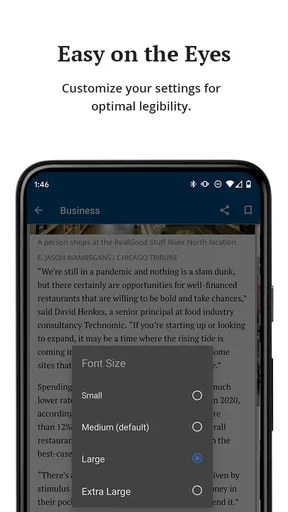
The user experience is smooth and responsive. The app loads articles quickly and the text is easy on the eyes. You can choose between light and dark mode, which is a nice touch for those late-night reading sessions. The article sharing feature is seamless, letting you easily share news with friends via social media or email. It’s all about making the news accessible and shareable.
Content Quality
We all know that the quality of content is key, and the app doesn’t disappoint. The articles are well-written and informative, covering a wide range of topics. The app provides a mix of breaking news, in-depth analysis, and opinion pieces, ensuring that you get a balanced view of the world. It's like having a team of top-notch journalists at your disposal.
Subscriptions and In-App Purchases
While the app is free to download, there are subscription options available for those who want full access to all the content. The subscription model is pretty standard for news apps, and it offers value for those who want comprehensive coverage. It’s a small price to pay for quality journalism and keeping yourself informed.
Final Thoughts
Overall, the app is a useful option for anyone looking to stay updated with news from Chicago. Its user-friendly interface and local focus make it most appealing to readers who want a regular connection to the city, rather than a replacement for every news source they use. I’d try it if Chicago coverage is part of my day, while keeping in mind that the purchase options and modest average rating call for a personal test before making it a daily habit.
That’s it for my review! If you’re ready to explore local reporting from the Chicago Tribune, you can find the app in your preferred app store. Happy reading!
Pros
- Comprehensive local news coverage.
- Intuitive and user-friendly interface.
- Customizable notification settings.
- Access to exclusive articles.
- Offline reading available.
Cons
- Subscription required for full access.
- Occasional ads in free version.
- Limited multimedia content.
- App size can be large.
- Notifications can be overwhelming.
FAQs for Chicago Tribune
What features does the Chicago Tribune app offer?
The Chicago Tribune app provides users with access to the latest news, in-depth articles, and multimedia content. It covers various topics such as local news, politics, sports, and entertainment. The app also offers personalized notifications, offline reading capabilities, and an easy-to-navigate interface to enhance the user experience.
Is the Chicago Tribune app free to use?
The app itself is free to download, but it may offer both free and premium content. Users can access a selection of articles for free, while a subscription might be required for full access to all features and premium content. Subscription options typically include monthly or annual plans.
Does the Chicago Tribune app support offline reading?
Yes, the Chicago Tribune app supports offline reading. Users can save articles to read later without an internet connection, making it convenient for those on the go or in areas with limited connectivity. This feature ensures you can stay informed even when offline.
How often is the content updated on the Chicago Tribune app?
Content on the Chicago Tribune app is updated continuously throughout the day, ensuring users have access to the latest news and developments as they happen. Breaking news notifications also keep users informed of major events and updates in real-time, enhancing the timeliness of information.
Can I customize my news feed in the Chicago Tribune app?
Yes, the Chicago Tribune app allows users to customize their news feed. You can select topics of interest to receive tailored content and notifications. This feature helps users focus on the news that matters most to them, providing a more personalized and relevant reading experience.


